Debian11升级Debian12
Debian 12 的生命周期为五年:首先是三年的完整 Debian 支持,至 2026年06月10日,然后是两年的长期支持(LTS), 至 2028年06月30日。在 LTS 支持周期中,受支持的架构会减少。
备份文件
大版本升级,很容易出现故障,所以非常有必要备份重要的文件。如果是阿里云、VPS之类的直接打个快照即可。
升级系统
更新包缓存和升级包到最新版本
1 | sudo apt update -y && sudo apt upgrade -y && sudo apt full-upgrade |
查看当前系统信息
1 | cat /etc/os-release |
输出系统信息:
1 | PRETTY_NAME="Debian GNU/Linux 11 (bullseye)" |
清理软件包
非不要请不要清理,防止出现问题
1 | apt autoremove |
配置apt软件源,更新为Debian12的源
1 | sudo sed -i 's|bullseye|bookworm|g' /etc/apt/sources.list |
打开/etc/apt/sources.list,检查源是否正确
1 | deb http://mirrors.aliyun.com/debian/ bookworm main |
升级
由于上一步更新了Debian12的软件园,先更新一下软件包缓存,然后升级。这个过程比较长,后需要还会出现交互信息,请耐心等待
1 | sudo apt update -y && sudo apt upgrade -y |
更新信息,一直按空格即可,到最后按q退出,等一会儿即可安装。
升级过程中会弹出下面的弹出,选择yes,按下回车继续等待。
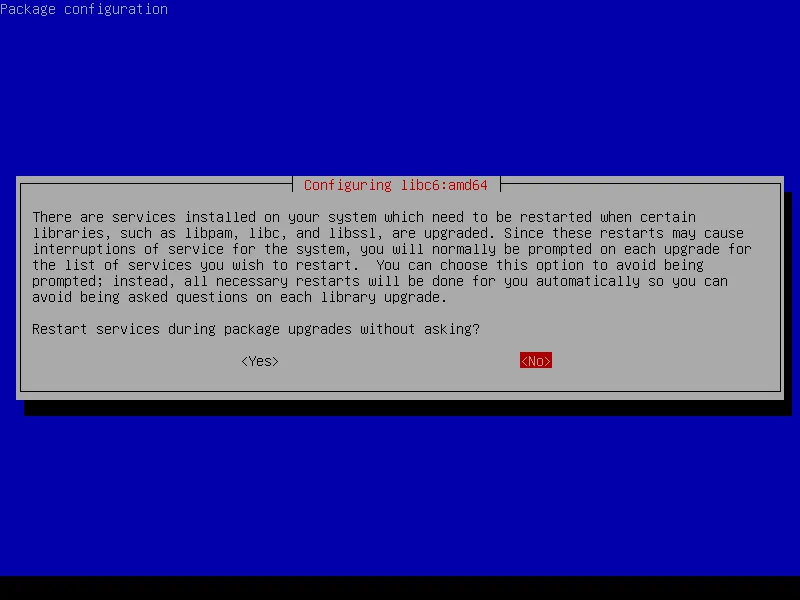
升级完成,检查系统
查看系统版本
1 | cat /etc/os-release |
输入如下:
1 | PRETTY_NAME="Debian GNU/Linux 12 (bookworm)" |
方便的话可以重启下服务器
1 | reboot |
本博客所有文章除特别声明外,均采用 CC BY-NC-SA 4.0 许可协议。转载请注明来源 码农笔记!
 wechat
 alipay
评论
WalineDisqus